


Depth Wallpapers & Live Clock
4.5401.00 Reviews
App Specs
- Version
- 2.1.06
- Updated On
- License
- Free
- Downloads
- 1,000,000+
- Developer
- JustNewDesigns
- Categories
- Personalization
- Platform
- Android
Screenshots
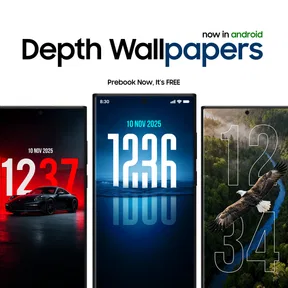






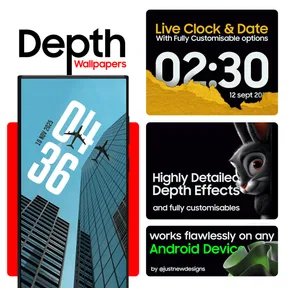
 Analysis by AppCompare
I like wallpaper apps that make a phone feel personal without turning a simple change into a project. Depth Wallpapers & Live Clock caught my attention because it combines a layered look with a clock, rather than treating the wallpaper and lock-screen details as entirely separate choices. My impression is that it works best for people who enjoy a carefully styled screen and are happy to spend a little time choosing an image and arranging its details.
What the visual approach gets right
The depth effect is the main reason to consider this app over a basic gallery of backgrounds. A suitable image can make the clock and subject feel arranged together, giving the screen more visual structure than a flat picture alone. I’d choose a wallpaper with a clear focal point and open space around it: a busy image may look attractive in the preview but compete with the clock once applied.
The clock is also more than a decorative extra. Its style and position can change the character of the screen, from restrained and practical to more expressive. I would treat placement as part of choosing the image, not as a final step: a clock that sits neatly against one background may cover the most interesting detail in another. A quick preview before committing is a useful habit whenever a wallpaper has a prominent subject.
Who will get the most from it
This is a strong fit if you like changing your phone’s look to match your mood, season, or current lock-screen layout. The favorites section makes that habit easier because it gives you a place to keep images you may want to revisit instead of searching through the full selection again. It can also suit someone who wants a more coordinated screen but doesn’t want to build a design from separate image and clock tools.
For example, I might save a calm landscape for workdays and a more colorful image for the weekend. Before switching, I’d check whether the clock remains readable and whether the depth effect works with the new image. That small check helps avoid a common wallpaper-app disappointment: a beautiful picture that looks less useful once the phone is actually being used.
If you prefer a plain background, rely on a very specific clock layout, or want extensive control over every part of the phone’s interface, this may not be the best match. A built-in wallpaper picker can be quicker for a simple static image, while a dedicated launcher or system customization tool may make more sense for broader changes. The appeal here is the combination of wallpaper, clock styling, and depth—not a promise to redesign every screen element.
A few practical trade-offs
Live or layered presentation can make a screen feel more distinctive, but it also means the result depends on the image, the clock’s placement, and how the phone displays the wallpaper. I’d favor clarity over complexity: keep the clock away from the main subject, and avoid choosing an image whose contrast makes the time hard to read. This is especially worth doing if you glance at the lock screen quickly while carrying something or heading out the door.
Worth Reading Before You Choose

EA SPORTS FC Mobile 26 Is a Bigger Football Game, but It Takes Time

Flipboard Shows What News Apps Must Do Beyond the Feed

Switching to Android Auto Means Rethinking Your Driving Routine

Google Calendar Makes a Crowded Week Easier to Manage

Ludo King Makes the Most of the Minutes Between Plans

Baby Panda World Brings Quick Play to Modern Phones, but Its Game Library Feels Busy
It is also sensible to judge battery and smoothness on your own device rather than assuming every phone will behave identically. In my use, the app felt smooth and the clock did not create an obvious battery concern, but display settings and individual usage can affect the experience. If you are cautious about battery life, try one wallpaper for an ordinary day before making it your permanent setup; that gives you a more useful comparison than judging from a short preview.
Trust, choices, and everyday use
Because a personalization app is used to alter something as visible as the lock or home screen, I think it’s worth paying attention to what the app actually asks you to do and what choices it presents. I prefer to make the wallpaper decision deliberately, review the preview, and use only the options I need. That keeps the setup focused on the visual result rather than changing more than I intended.
When I’m choosing a wallpaper, I also consider the information already visible on my screen. A clock can be convenient, but the background should not make notifications or other screen details harder to distinguish. If you share your phone with someone, or often leave it face-up in public, a less revealing image and a simpler lock-screen arrangement may be more comfortable than a highly personal design. Those are general screen choices, not a claim about the app’s data practices.
JustNewDesigns makes this free personalization app, which has an Everyone age rating and a 4.5 average from around 4.4 thousand ratings. It has passed 500 thousand installs, so it has found an audience among people who want more than a plain background. The current version is 1.3.22, and the app is listed for devices running version 8.1 or later. Optional in-app purchases range from 49 cents to $7.99 per item, so I’d check the price shown for any extra before choosing to buy it.
First Impressions
Downloading the app was a breeze. It’s available for both Android and iOS, and the installation process was quick and straightforward. Once I opened the app, I was greeted by a sleek and intuitive interface. The developers clearly put thought into the design, making it user-friendly even for those who might not be super tech-savvy.
The first thing I noticed was the variety of wallpapers available. The app offers a wide range of high-quality images, from serene landscapes to abstract art, all optimized for different screen sizes. What caught my eye, though, was the ability to add a live clock to each wallpaper, which is a pretty neat feature.
Exploring the Features
The customization options are where Depth Wallpapers & Live Clock really shines. You can choose from several clock styles, ranging from minimalistic to ornate, and position them anywhere on the screen. This flexibility allows you to create a look that’s truly your own.
One thing I appreciated was the ability to adjust the depth effect. This feature adds a sense of dimension to your wallpaper, making it feel almost 3D. It’s subtle but definitely enhances the overall aesthetic. Plus, you can tweak the settings to match your preferences, which is a nice touch.
The app also includes a favorites section, where you can save your most-loved wallpapers for easy access. This is perfect for someone like me who likes to switch things up frequently.
Performance and Usability
In terms of performance, the app runs smoothly with no noticeable lag. The wallpapers load quickly, and the live clock doesn’t drain the battery as I initially feared. It’s optimized to ensure that your phone’s performance isn’t compromised, which is always a concern with live wallpapers.
As for usability, the app is incredibly easy to navigate. The settings are straightforward, and the app guides you through the process of applying a wallpaper with clear instructions. Even if you’re not a tech wizard, you’ll have no trouble getting everything set up.
Final Thoughts
Overall, Depth Wallpapers & Live Clock is a fantastic app for anyone looking to add a little extra flair to their device. The combination of beautiful wallpapers and a customizable live clock offers a unique way to personalize your phone, and the depth effect adds a modern touch that’s hard to resist.
Whether you’re someone who changes their wallpaper weekly or likes to stick with one look for a while, this app has something to offer. It’s easy to use, performs well, and provides a plethora of options to suit any style. If you’re in the market for a new wallpaper app, I’d highly recommend giving this one a try.
Pros
- Stunning high-resolution wallpapers
- Customizable live clock feature
- User-friendly interface design
- Regular updates with new content
- Low battery consumption
Cons
- Limited free wallpaper options
- Requires internet for full functionality
- Ads can be intrusive at times
- Occasional app crashes reported
- No offline mode for live clock
FAQs for Depth Wallpapers & Live Clock
What features does Depth Wallpapers & Live Clock offer?
Depth Wallpapers & Live Clock provides a vast collection of high-quality, 3D depth effect wallpapers and live clocks. The app allows customization of your home and lock screens with dynamic visuals. You can adjust the depth effect intensity and choose from various clock styles to suit your preferences.
Is Depth Wallpapers & Live Clock free to use?
The app offers both free and premium features. While you can access a limited selection of wallpapers and clocks for free, subscribing to the premium version unlocks the full library and additional customization options. It's a great way to enhance your experience if you enjoy personalized aesthetics.
How does the app impact battery life?
Depth Wallpapers & Live Clock is designed to be battery-efficient. However, like any app with dynamic visuals, it does consume more resources than static wallpapers. The impact on battery life will vary depending on your device and usage patterns, but it is optimized to minimize drain.
Is Depth Wallpapers & Live Clock compatible with all devices?
The app is compatible with most Android and iOS devices. However, older devices may not support all features, especially those requiring higher processing power for 3D effects. It's recommended to check the app's compatibility with your device's specifications before downloading.
Can I use my own images with the app?
Currently, Depth Wallpapers & Live Clock does not support the use of personal images for creating custom wallpapers. The app focuses on providing a curated collection of professionally designed wallpapers to ensure optimal depth effects and visual quality.


